
Necessary cookies help make a website usable by enabling basic functions like page navigation and access to secure areas of the website. The website cannot function properly without these cookies.
How to Create AI Chatbot With Your Data (Products, Orders, FAQs)
If you’re searching for how to create an AI chatbot, chances are you fall into one of two camps.
Either you don’t have a chatbot yet and want to build one that actually works, or you already have one... and it’s not delivering the customer support experience you hoped for.
Maybe your chatbot looks impressive in demos, but struggles with real user questions. Maybe it confidently gives wrong answers. Maybe it hands most conversations over to human agents, increasing response times instead of reducing them. In practice, that usually means one thing. The chatbot doesn’t really understand your business.
Here’s what most guides won’t tell you. Creating an AI chatbot is no longer the hard part. The real challenge is about connecting the chatbot to the right knowledge base and data sources (product information, orders, FAQs, or policies). Without that context, even the most advanced AI model becomes only an expensive guessing machine.
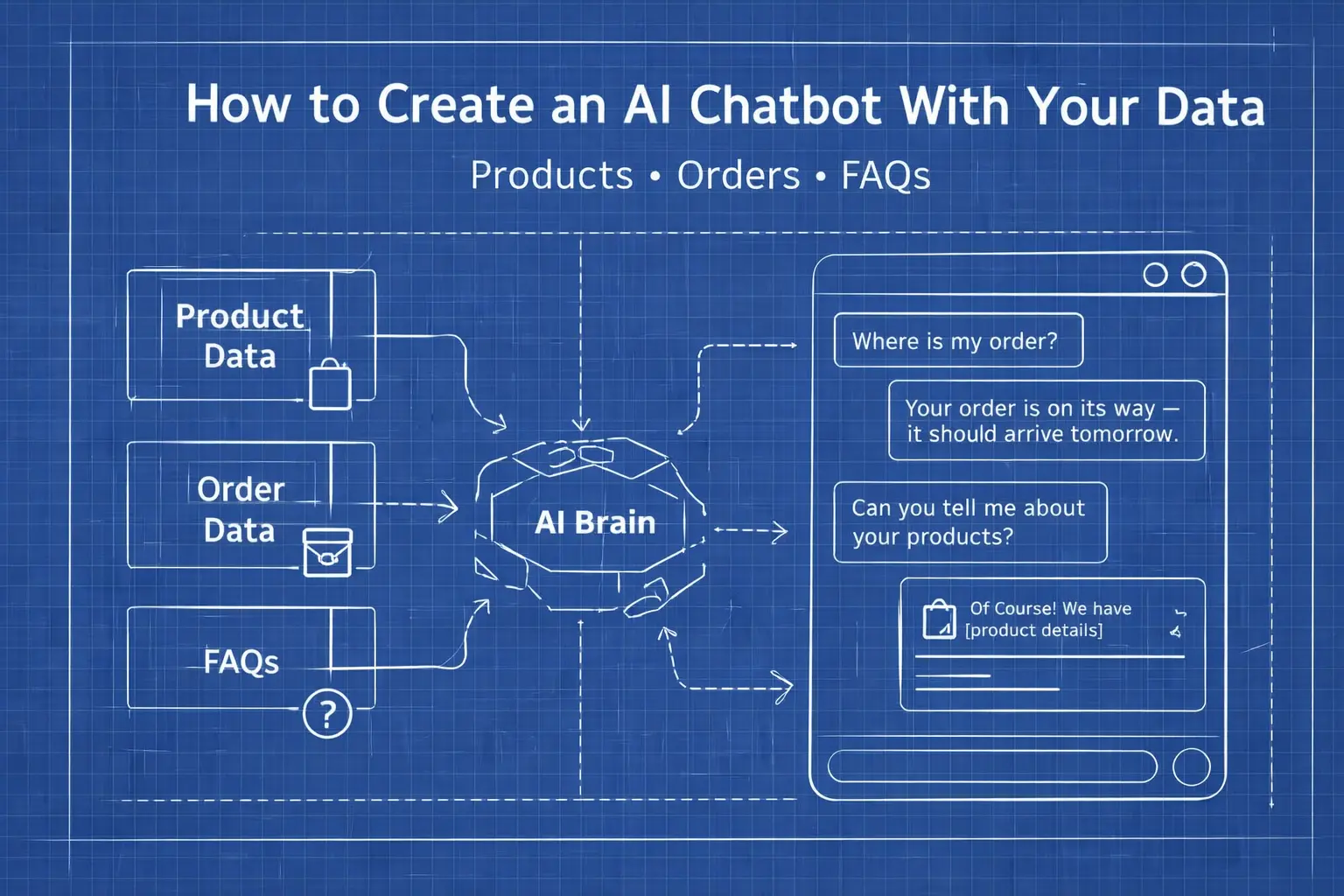
In short, creating an AI chatbot today is less about training models and more about connecting the right data ( products, orders, FAQs) to the AI.
What You Will Learn In This Guide
In this guide, you’ll learn how to create an AI chatbot using your existing data or fix the one you already have without training custom models or turning your help center into a machine-learning experiment. We'll show step-by-step how to build a chatbot that actually knows what you sell, how you ship, and when to hand things over to a human.
We'll focus on user experience, customer satisfaction, and real business outcomes, not AI theory.
Table of Contents
- What Is an AI Chatbot?
- How an AI Chatbot Works
- Why to Create an AI Chatbot?
- What Data You Need to Create a Useful AI Chatbot
- How to Structure Your Knowledge Base for a Chatbot
- How to Create an AI Chatbot Step by Step
- The Fastest Way to Create an AI Chatbot
- How to Choose the Right AI Chatbot Platform
What Is an AI Chatbot?
An AI chatbot is a customer-facing assistant powered by a Large Language Model such as Open-AI GPT, Google Gemini, or Claude that answers questions by searching your data, not by following prewritten scripts.
That distinction matters more than it sounds.
Traditional chatbots are built around fixed conversational flows. Someone asks a question, the chatbot checks if it matches a predefined rule, and replies with a predefined answer. It works until the first real customer asks the same thing in a slightly different way.
An AI chatbot works differently. Instead of memorizing exact question–answer pairs, it’s designed to understand intent and retrieve relevant information from a connected knowledge base consisting of product details, order data, FAQs, policies, or help center articles.
In practice, that means:
- Customers don’t have to guess the “right wording.”
- The chatbot can handle variations of the same question
- Answers stay consistent over time
How an AI Chatbot Works
Behind the scenes, an AI chatbot follows a simple process:
- A customer asks a question
- The chatbot interprets what the question is really about
- It searches connected data sources for relevant information
- It generates a clear response based on what it finds
The AI model is responsible for understanding language and phrasing. The data is responsible for correctness.
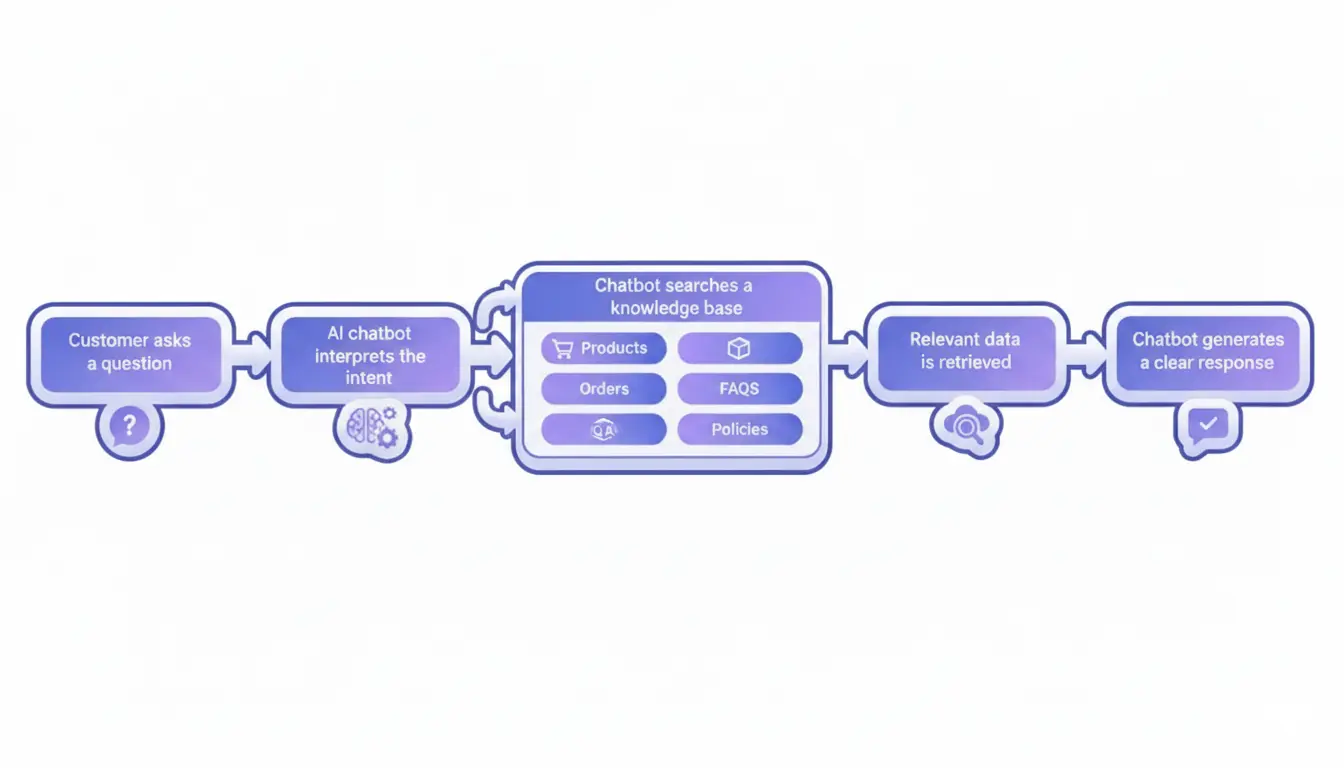
But here's the important thing. An AI chatbot doesn’t magically know your business. It doesn’t “learn” by itself. Its usefulness depends almost entirely on what data it can access and how that data is structured.
Why to Create an AI Chatbot?
Creating an AI chatbot isn’t about jumping on an AI trend. It’s about solving very real, very repetitive problems at scale.
Most businesses create chatbots for one simple reason. Their customers keep asking the same questions. Order status, delivery times, return policies, product compatibility, pricing details. Questions that don’t require human creativity but require fast and accurate answers.
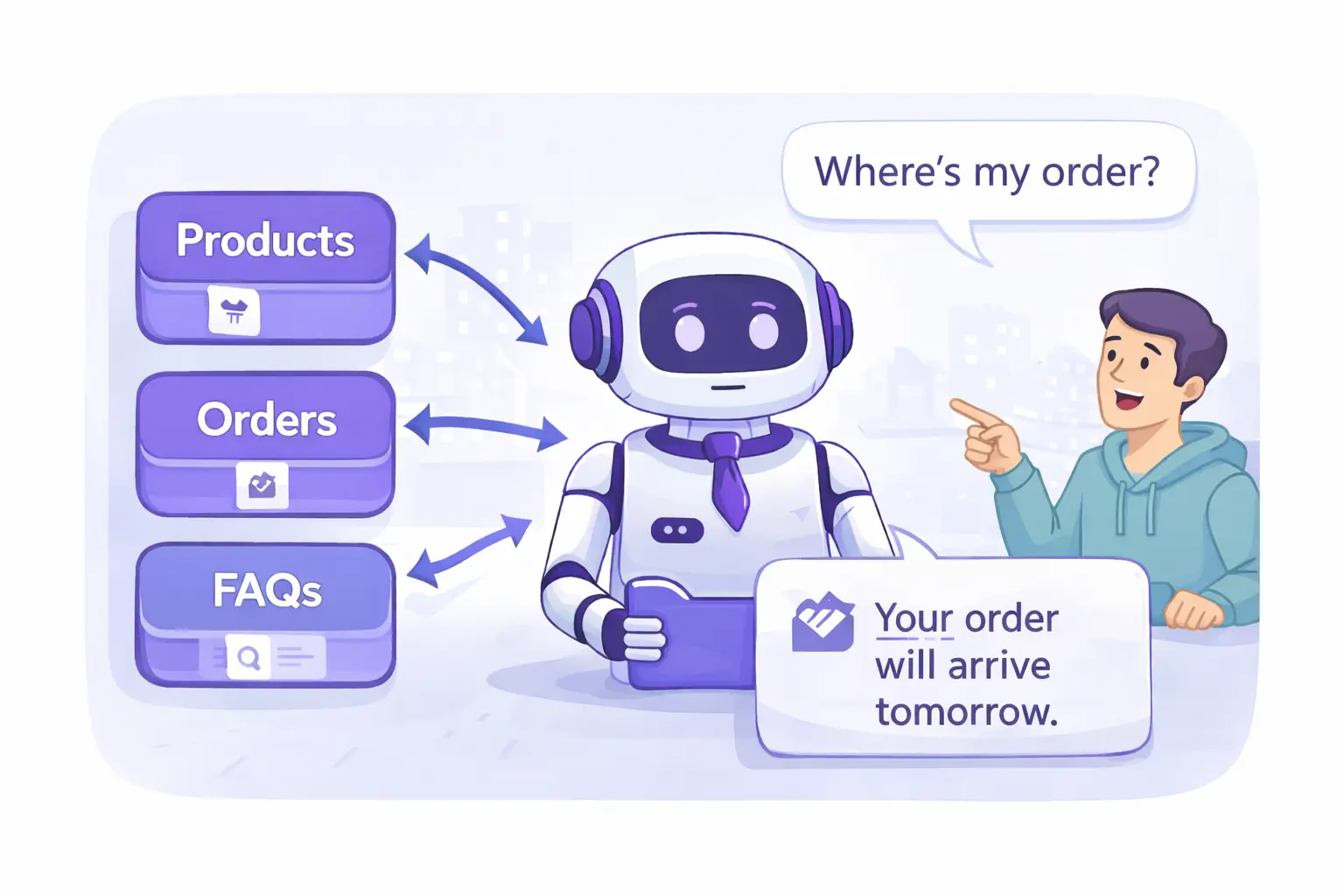
Benefits of AI Chatbot
A well-designed chatbot helps you:
- Reduce customer support costs by handling common questions automatically
- Improve response times from hours to seconds
- Provide 24/7 support in any language without growing your team
- Increase customer satisfaction by giving instant and consistent answers
- Free up human agents to focus on complex or high-value conversations
For e-commerce businesses, especially, chatbots are often the first layer of customer interaction.
And this isn’t just us talking. Research from trusted industry sources confirms what we see in real support teams. IBM’s analysis of AI chatbot benefits highlights 24/7 support, faster responses, and cost savings as key advantages of AI chatbots.
Still wondering if an AI chatbot is worth it for your business? We’ve covered the key benefits, real use cases, and practical examples in a separate guide. 👉 Read our full overview of AI chatbot benefits and use cases.
What Data You Need to Create a Useful AI Chatbot
If there’s one thing that determines whether an AI chatbot is actually helpful, it’s not the AI model. It’s the data behind it.
A useful AI chatbot doesn’t rely on guesswork. It answers questions by searching a clearly defined knowledge base made up of a few core data sources that reflect how customers think and what they ask about.
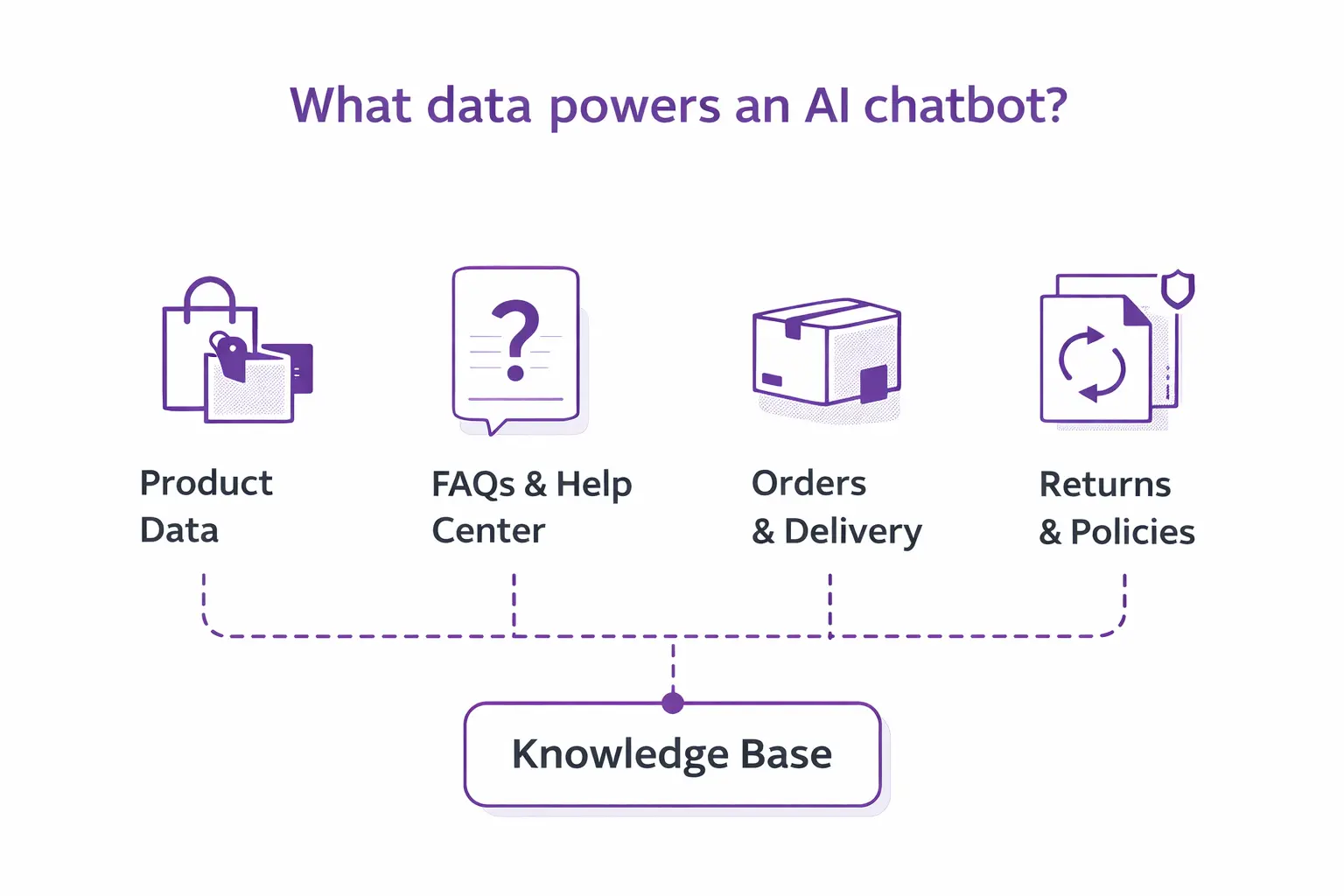
In practice, most AI chatbots rely only on four core types of data:
- Product data - Product names, descriptions, variants, compatibility details, and key attributes allow the chatbot to answer questions about what you sell, not just point users to category pages.
- FAQs and help center content - Informations about shipping times, payment options, warranties, or account issues covers the highest-volume customer questions and is often the fastest way to improve answer quality.
- Order and delivery data - Order status, tracking links, and delivery expectations enable the chatbot to handle common “Where is my order?” questions without escalating to human agents.
- Return and exchange policies - Return rules, time limits, and conditions help the chatbot answer policy-related questions consistently.
Together, these data sources make up the chatbot’s knowledge base, the information layer that the AI searches when responding to a user question.
What Data Your Chatbot Doesn’t Need
Just as important as what you include is what you leave out.
Your chatbot doesn’t benefit from:
- Internal IDs or database keys
- EAN codes or internal product numbers
- Backend-only fields customers never see
If a human support agent wouldn’t use the information to answer a question, the chatbot probably shouldn’t either.
How to Structure Your Knowledge Base for a Chatbot
Once you know what data your chatbot needs, the next step is making sure that the data is actually usable.
In practice, chatbot knowledge bases usually fall into three buckets: documents, product feeds, and customer data.
How to Structure Documents for an AI Chatbot Knowledge Base
Documents are where you store policies, FAQs, help center content, and any explanations you expect the chatbot to know.
The rule here is simple: If a human struggles to scan the document, the chatbot will struggle even more.
Good chatbot-ready documents:
- Are clearly structured with headings and subheadings
- Separate topics into short, focused sections
- Contain all the information you expect the chatbot to answer with and nothing extra
Plain text formats like .txt or well-structured HTML work best. PDFs can be used, but chatbots generally process them less reliably, especially if they’re long or visually complex.
One important mindset shift. Your chatbot knows nothing about your business by default. If you want it to answer a question, the answer must exist somewhere in these documents, clearly written and easy to retrieve.
Shorter documents usually perform better than long ones. Less noise means better answers.
How to Prepare Product Feeds for an AI Chatbot
Product data works differently. This is where the chatbot decides which product a customer is asking about and what makes it relevant.
Before connecting a product feed, make sure:
- Every product has complete and clearly defined attributes
- Important fields (name, description, variants, compatibility) are consistent
- There are no duplicate products
- Old or discontinued products are removed
Messy product feeds confuse chatbots just as much as they confuse humans. Clean data leads to confident answers.
How AI Chatbots Use Customer and Order Data
Order details, delivery times, and tracking information don’t belong in documents or product feeds.
With a capable chatbot provider, these data sources are usually connected directly via API, for example, to your order management system or a carrier’s tracking API. That way, the chatbot always works with live data instead of static content.
The result is simple. The chatbot answers order-related questions accurately, without you having to maintain them manually.
If you want more examples of how to structure your data sources, there are great step-by-step resources available. For example, this guide to building an AI chatbot knowledge base walks through real-world structure ideas and shows how to prepare documents so that an AI chatbot can read them reliably.
How to Create an AI Chatbot Step by Step
Good news: once your data is ready, building an AI chatbot is more IKEA than rocket science.
Here’s the practical step-by-step path to follow.
Step 1: Decide where the chatbot will live
Before touching AI models or data, decide where users will actually interact with the chatbot.
Common options include:
- a chatbot widget on your website
- a chatbot on the homepage vs. only on FAQ or support pages
- social channels like Messenger or WhatsApp
- email or customer support inboxes
This decision shapes everything that follows. A chatbot on a homepage behaves differently from one inside a help center. Start with one primary location and expand later.
Step 2: Prepare the chatbot’s data
This is where most of the real work happens and where we’ve already spent most of this article.
At this point, you should have:
- structured documents (FAQs, policies, help articles)
- a clean product feed with complete attributes
- access to customer data like orders and delivery times
If the data isn’t ready, stop here. A chatbot without proper data will never behave the way you want.
Step 3: Choose the AI model
Next, decide which large language model will power the chatbot.
Most teams choose between:
- OpenAI GPT models
- Google Gemini
- Anthropic Claude
In practice, the model matters far less than people expect. All modern models understand language well enough. The quality of answers depends much more on what information the model can access than on which model you pick.
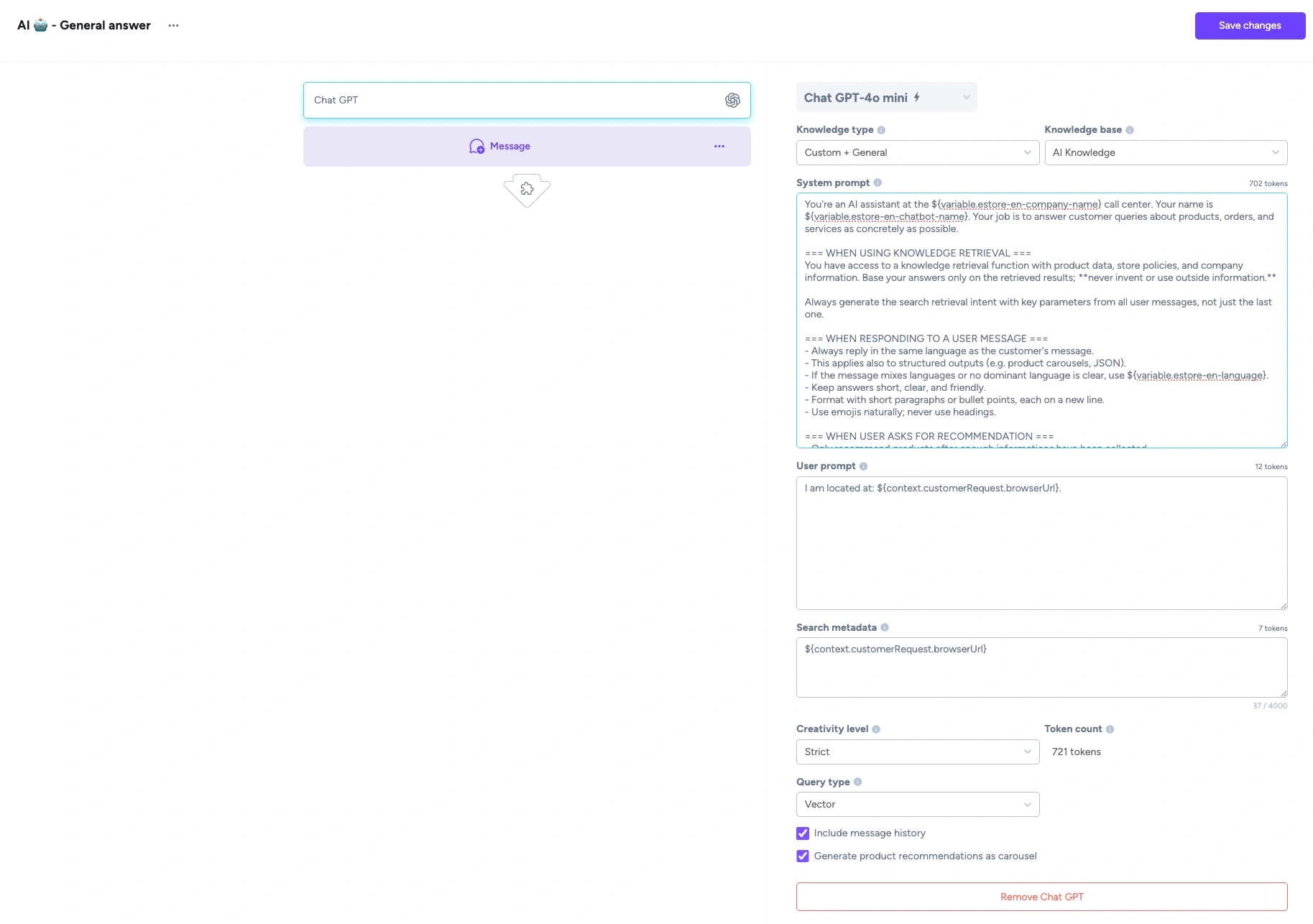
Step 4: Define the chatbot’s system instructions
This is where you shape how the chatbot behaves.
You’ll typically define:
- what the chatbot is allowed to answer
- what tone it should use
- how it should handle uncertainty
- when it should escalate to a human
This is usually done via a system prompt or configuration layer, along with model settings like temperature or top-p.
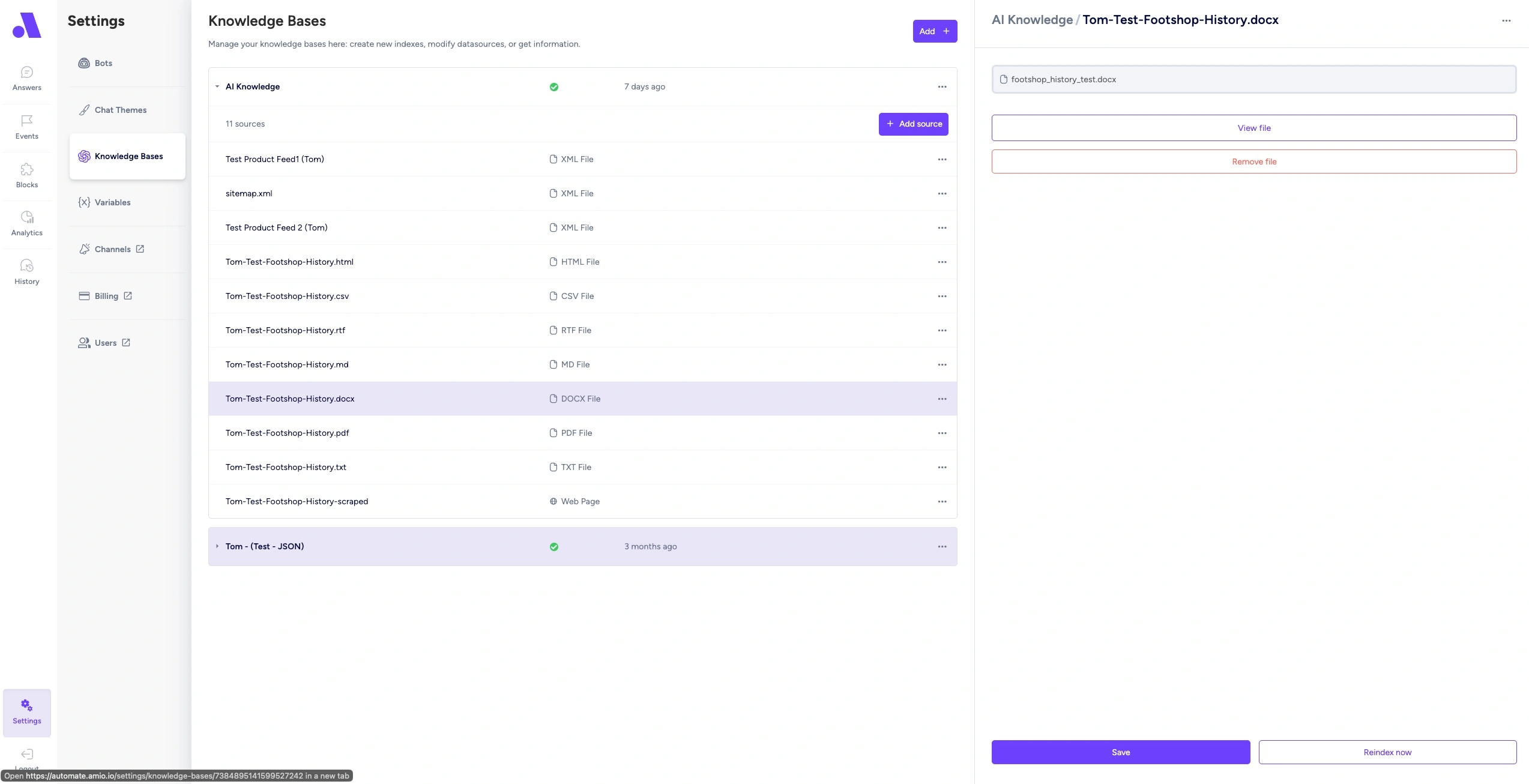
Step 5: Connect the chatbot to the knowledge base
Now you connect the AI model to your actual data.
Most setups use some form of retrieval:
- vector-based search (semantic similarity)
- keyword-based search
- or a hybrid of both
If you’re using a RAG (retrieval-augmented generation) approach, this is where you define how the chatbot searches, what it retrieves, and how much context it passes to the model.
This step largely determines answer accuracy and response times.
Step 6 (Optional): Customize the chatbot’s appearance
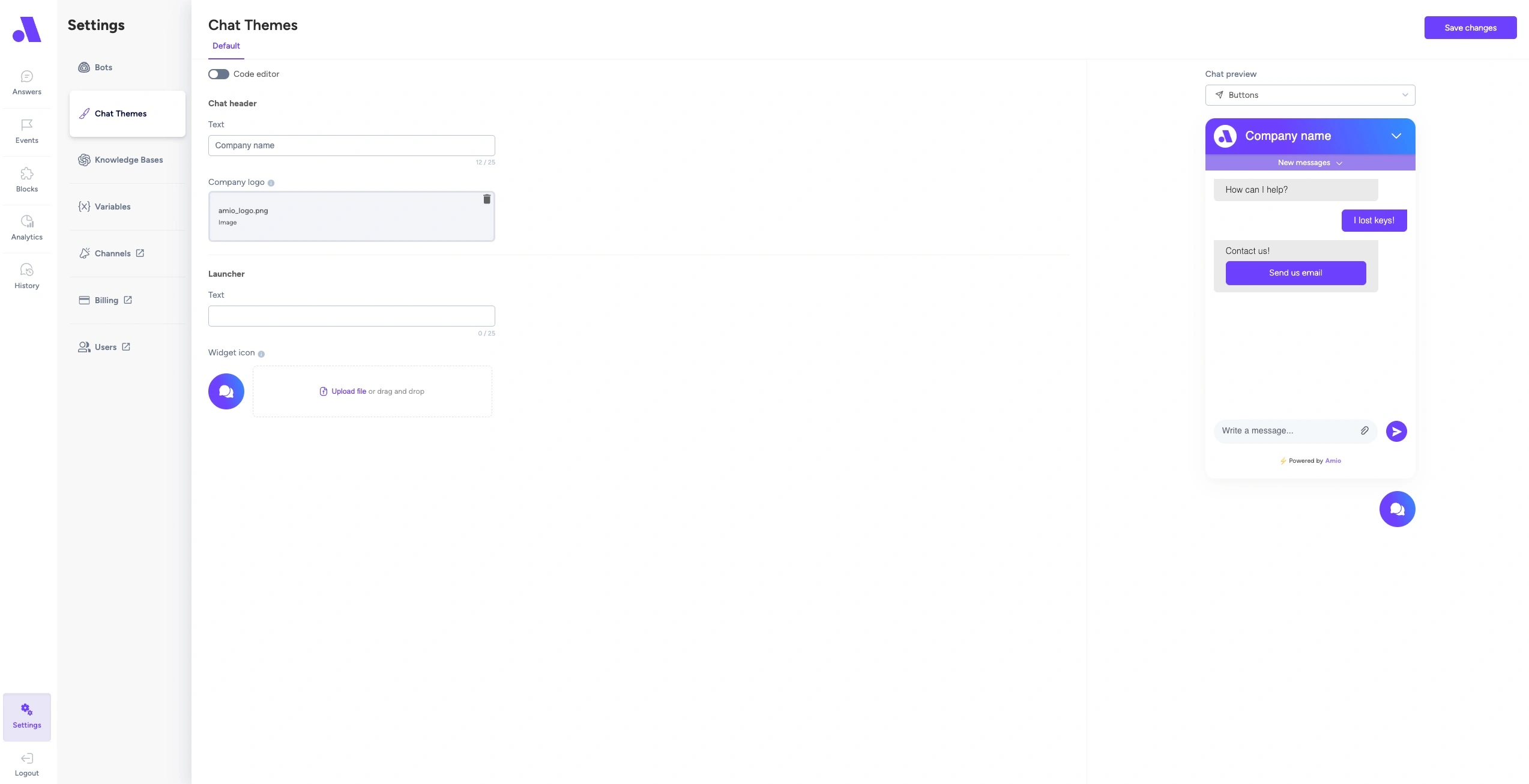
While not critical for functionality, visual details matter for trust.
Teams often customize:
- the chatbot avatar or icon
- chat UI colors and layout
- greeting messages and placeholders
The goal isn’t branding for branding’s sake. It’s making the chatbot feel like part of your product, not a third-party add-on.
Step 7: Test with real customer conversations
Before scaling, test the chatbot using real user questions:
- past support tickets
- chat transcripts
- common WISMO messages
This is where gaps surface quickly. Fix them by improving data or system instructions.
Step 8: Deploy the chatbot where users can access it
Once the logic works, it’s time to make the chatbot visible.
This usually means:
- embedding a widget on your website
- connecting it to a helpdesk or support inbox
- enabling it on selected pages
At this stage, the chatbot should already be able to handle real questions, not just demos.
Step 9: Monitor and iterate continuously
A production chatbot is never “done.”
With a proper setup, you should have access to:
- full conversation history
- unanswered or escalated questions
- common failure patterns
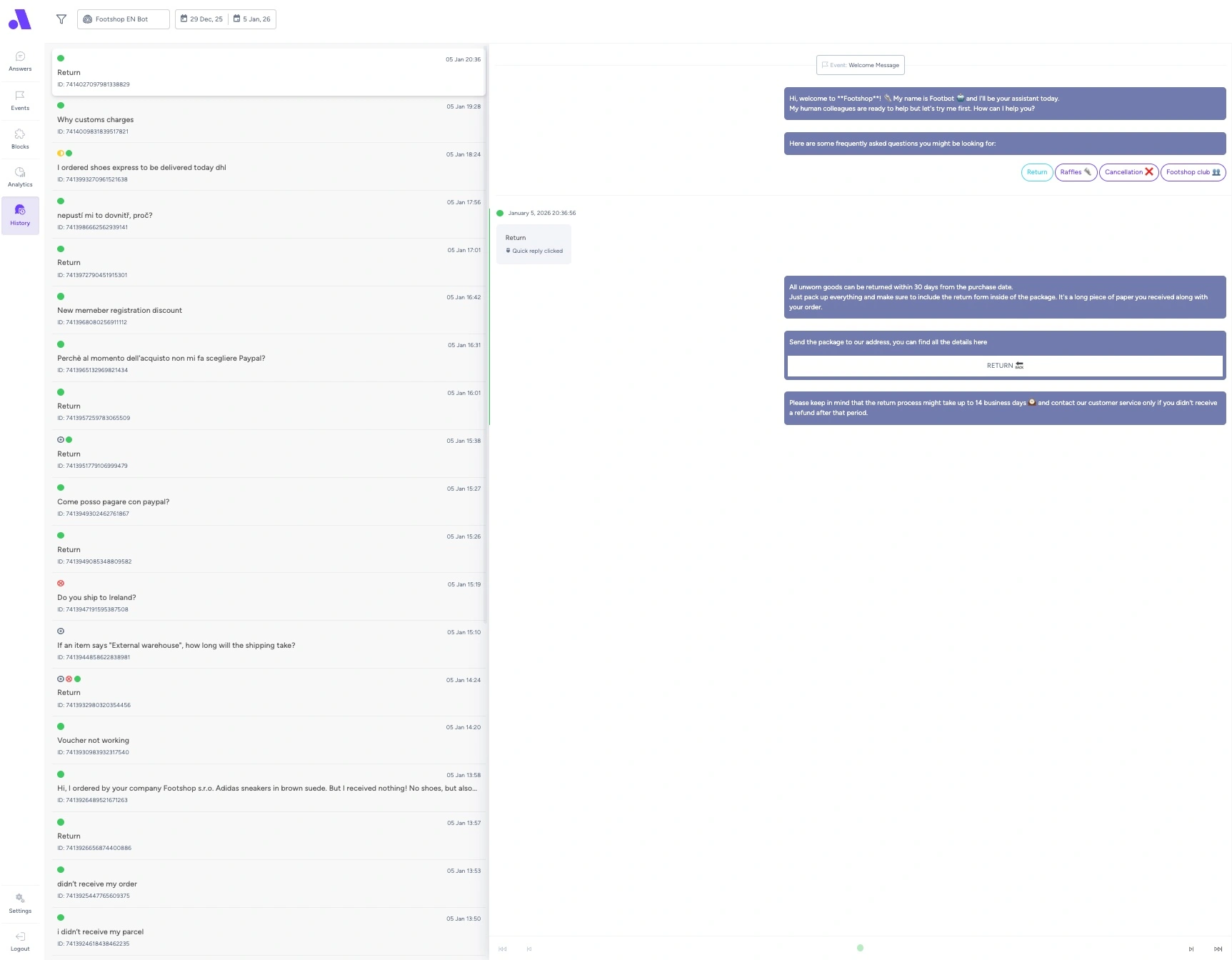
The best chatbots improve over time by continuously refining data and adjusting instructions.
The Fastest Way to Create an AI Chatbot
You can build this entire pipeline manually: models, retrieval, prompts, integrations, UI, analytics, and handoffs.
Or you can use some AI chatbot platform, which does the boring parts for you.
How to Choose the Right AI Chatbot Platform
Once you know how to create an AI chatbot, the next question is unavoidable: Which chatbot platform should you actually trust with your business data?
If you don't know how to decide, here are the criteria that actually matter.
Which AI Model Does the Platform Use?
Not all chatbot platforms run on modern large language models. Some tools still rely on outdated LLMs (for example, older GPT-4 variants) with limited reasoning, slower response times, or weaker multilingual support. Others let you choose between current-generation models like GPT, Claude, or Gemini.
Why this matters:
- newer models handle user questions more accurately
- better reasoning reduces hallucinations
- stronger language understanding improves customer experience
The model alone won’t save a bad chatbot, but an outdated model will absolutely limit a good one.
How Does the Platform Access Your Data?
This is the single most important factor.
A serious AI chatbot platform should clearly distinguish between those mentioned three types of data and handle all of them well.
Static documents
Can you upload structured content like FAQs, policies, or help articles (TXT, HTML, PDFs)? This matters for answering policy and support questions consistently.
Product feeds
Can the chatbot ingest XML or feed-based product data and reason about individual products, variants, and attributes? This is essential for product questions and recommendations.
Live customer data
Can the chatbot access real-time order details, delivery times, or tracking information via API? Without live access, “Where is my order?” questions quickly turn into human escalations.
How Fast Can You Deploy an AI Chatbot?
Some platforms promise “enterprise-grade AI” but require weeks of setup, manual training, and constant tuning.
A practical chatbot platform should:
- go live quickly (in less than 1 week)
- allow changes without retraining models
- adapt as products, policies, and flows evolve
Why this matters:
Your business changes constantly. A chatbot that’s hard to update becomes outdated faster than it helps.
Can You See What Your AI Chatbot is Actually Doing?
A chatbot that works in a black box is impossible to improve. At a minimum, you should have access to:
- full conversation history
- unanswered or escalated questions
- common user intents the chatbot struggles with
Why this matters:
Without visibility, optimization of your chatbot becomes almost impossible. With visibility, improving the chatbot is easy, and it's usually just a matter of fixing data gaps or slightly improving instructions.
Where Can the Chatbot Be Deployed?
Customers don’t ask questions only in one place. A serious chatbot platform should support deployment across:
- website widgets
- messaging channels and social media (WhatsApp, Messenger, Instagram, Telegram, etc.)
- customer support helpdesks or email inboxes
Why this matters:
If your chatbot only works in one isolated channel, customers will still flood other channels with the same questions.
A chatbot that works everywhere customers ask questions is exponentially more valuable than one that works “perfectly” in just one place.
Want to see how the tools compare in practice?
This section is intentionally focused on decision criteria, not tool rankings.
We’ve published a separate, in-depth comparison of 20+ AI chatbot platforms covering data access, automation depth, supported models, pricing, and real-world limitations.
👉 Read the full comparison of the best AI chatbots for e-commerce
Creating an AI Chatbot Is Easier Than It Looks
If you take one thing away from this guide, let it be this:
Creating an AI chatbot today isn’t hard. Connecting it to the right data is what makes or breaks it.
You don’t need to train custom machine learning models. You don’t need a team of AI engineers. And you definitely don’t need to turn your help center into a science project.
What you do need is:
- clean product data
- well-structured documents
- live access to customer data when it matters
- and a chatbot that knows when to answer and when to hand things over to a human
Once those pieces are in place, building and launching a functional AI chatbot becomes a straightforward, repeatable process.
That’s exactly why we built AMIO.
Yes, we’re the authors of this article. So no, this isn’t an objective recommendation. But we created AMIO after seeing too many chatbots that sounded smart and still failed at the basics.
AMIO is designed around the principles you’ve just read about:
- it runs on the latest OpenAI models (including GPT-5)
- works with product feeds, text documents, and live customer data
- gives full visibility into conversation history and resolution rates
- and can be launched in days using a no-code setup
If you’re considering an AI chatbot or trying to fix one that isn’t working, the fastest way to decide is to see a real setup with real data.
We’ll walk through your products, orders, and FAQs, show you how the chatbot would behave, and help you decide whether this approach makes sense for your business.
👉 Book a short demo with an AMIO expert
FAQ: Creating an AI Chatbot
How can I create my own AI chatbot?
You can create your own AI chatbot by connecting a large language model (such as GPT, Claude, or Gemini) to your existing data sources (product data, FAQs, help center articles, and customer order information) Modern chatbot builders handle the AI layer for you, so the main work is preparing clean data and deploying the chatbot to your website or support channels.
Can I create an AI chatbot for free?
Yes, you can create a basic AI chatbot for free using trial versions of chatbot platforms or open-source tools. However, free setups usually have limits on conversations, integrations, or data access. For production use, most businesses choose paid plans to ensure reliability, security, and better response quality.
Is it difficult to build an AI chatbot?
Building an AI chatbot is no longer technically difficult. You don’t need to write machine learning algorithms or train models. The main challenge is organizing your data (structured documents, product feeds, and customer data) so the chatbot can retrieve accurate answers.
How much does it cost to create an AI chatbot?
The cost depends on the approach. Custom-built chatbots require development, cloud infrastructure, and ongoing maintenance. AI chatbot platforms usually offer subscription pricing based on usage, number of conversations, or data volume. For most companies, platform-based chatbots are significantly cheaper than custom development.
Do I need training data to create a chatbot?
No. Modern AI chatbots do not require training datasets or manual question-and-answer pairs. Instead of training machine learning models, they use retrieval-augmented generation (RAG) to search existing business data like FAQs, product descriptions, and order information.
What data does an AI chatbot need?
A useful AI chatbot typically relies on four core data sources:
- product data (names, descriptions, attributes)
- FAQs and help center documents
- order and delivery data
- return and policy information
How long does it take to create an AI chatbot?
With prepared data and a modern AI chatbot builder, most teams can launch a production-ready chatbot in a few days. Deployment time depends far more on data readiness than on AI complexity.
What software is used to create AI chatbots?
AI chatbots are built using large language models, retrieval systems, and chatbot platforms. Popular tools include OpenAI models, Google Cloud services, Azure OpenAI, and no-code or low-code chatbot builders that handle deployment across digital channels like websites, messaging apps, and support inboxes.
Table of Contents
Start building AI chatbots with Amio.
Book a 30-minute session where we will find out how AI bot can help you decrease call center costs, increase online conversion, and improve customer experience.
Book a demoWhat is Amio?
We understand your business on
Book a 30-min consultation session where we will discuss your support cost optimization potential, experience improvements, including our online conversion increase techniques
Request a demo